
EL-A3 Robotic Arm
7-DOF 桌面机械臂项目,包含纯 Python SDK 和 ROS2 控制系统两个独立子项目。
子项目
| 项目 | 路径 | 说明 |
|---|---|---|
| Python SDK | el_a3_sdk/ | 纯 Python SDK,Direct CAN 通信,多臂管理,Pinocchio 动力学 |
| ROS2 控制系统 | el_a3_ros/ | ros2_control 硬件接口,MoveIt2 运动规划,URDF 描述 |
| 硬件制造资料 | hardware/ | STEP 模型、3MF 打印文件、线束图纸、PCB 资料、组装 SOP |
各子项目的详细文档请参阅对应目录下的 README.md。
注意:
hardware/目录中的大文件通过 Git LFS 管理,首次克隆后请执行git lfs pull。
硬件要求
| 项目 | 规格 |
|---|---|
| 机械臂 | EL-A3 7-DOF(6 臂关节 + L7 夹爪) |
| 电机 | Robstride RS00 ×3(L1-L3)+ EL05/RS05 ×4(L4-L7) |
| CAN 适配器 | CANdle / gs_usb 兼容设备 |
| 电源 | 24V / 48V 直流电源 |
| PC | Ubuntu 22.04+ x86_64 |
电机配置
| 关节 | 电机ID | 型号 | 力矩限制 | 速度限制 | 位置限制 | 方向 |
|---|---|---|---|---|---|---|
| L1 | 1 | RS00 | ±14 Nm | ±33 rad/s | ±2.79 rad (±160°) | -1 |
| L2 | 2 | RS00 | ±14 Nm | ±33 rad/s | 0~3.67 rad (0°~210°) | +1 |
| L3 | 3 | RS00 | ±14 Nm | ±33 rad/s | -4.01~0 rad (-230°~0°) | -1 |
| L4 | 4 | EL05/RS05 | ±6/±5.5 Nm | ±50 rad/s | ±1.57 rad (±90°) | +1 |
| L5 | 5 | EL05/RS05 | ±6/±5.5 Nm | ±50 rad/s | ±1.57 rad (±90°) | -1 |
| L6 | 6 | EL05/RS05 | ±6/±5.5 Nm | ±50 rad/s | ±1.57 rad (±90°) | +1 |
| L7(夹爪) | 7 | EL05/RS05 | ±6/±5.5 Nm | ±50 rad/s | ±1.57 rad (±90°) | +1 |
软件环境
| 依赖 | 版本 / 说明 |
|---|---|
| 操作系统 | Ubuntu 22.04+ (x86_64) |
| Python | 3.10+ |
| ROS2 | Humble Hawksbill(仅 ROS2 子项目需要) |
| CAN 总线 | SocketCAN · CAN 2.0 扩展帧 · 1 Mbps |
| 核心 Python 依赖 | numpy、pyyaml |
| 可选 Python 依赖 | pinocchio(pip install pin)— FK/IK/重力补偿 |
| Debugger 上位机 | pyqt6、pyqtgraph、pyvista、pyvistaqt(pip install -e ".[debugger]") |
| ROS2 依赖 | ros2_control、MoveIt2、pick_ik、joy 等(通过 scripts/install_deps.sh 安装) |
Debugger 上位机安装
Debugger 提供 PyQt6 GUI 界面,内含基于 PyVista (VTK) 的 3D URDF 可视化、关节拖拽控制、实时监控等功能。
已在 Ubuntu 22.04 + Python 3.10 环境验证(PyQt6 6.11 / pyvista 0.47 / vtk 9.5)。
# Ubuntu 系统依赖(OpenGL 运行库 + Qt xcb 平台插件依赖)# 注:Ubuntu 22.04 起 libgl1-mesa-glx 已被 libgl1 取代;Qt 6.5+ 需要 libxcb-cursor0sudo apt install -y libgl1 libxrender1 libxcb-xinerama0 libxcb-cursor0 # 以可编辑模式安装 SDK 及 Debugger 依赖(pyqt6 / pyqtgraph / pyvista / pyvistaqt)# dynamics 附加项安装 Pinocchio(pin),用于 FK/IK 与重力补偿cd el_a3_sdkpip install -e ".[debugger,dynamics]" # 启动上位机(安装在 ~/.local/bin,需确保其在 PATH 中)el-a3-debugger
特别注意
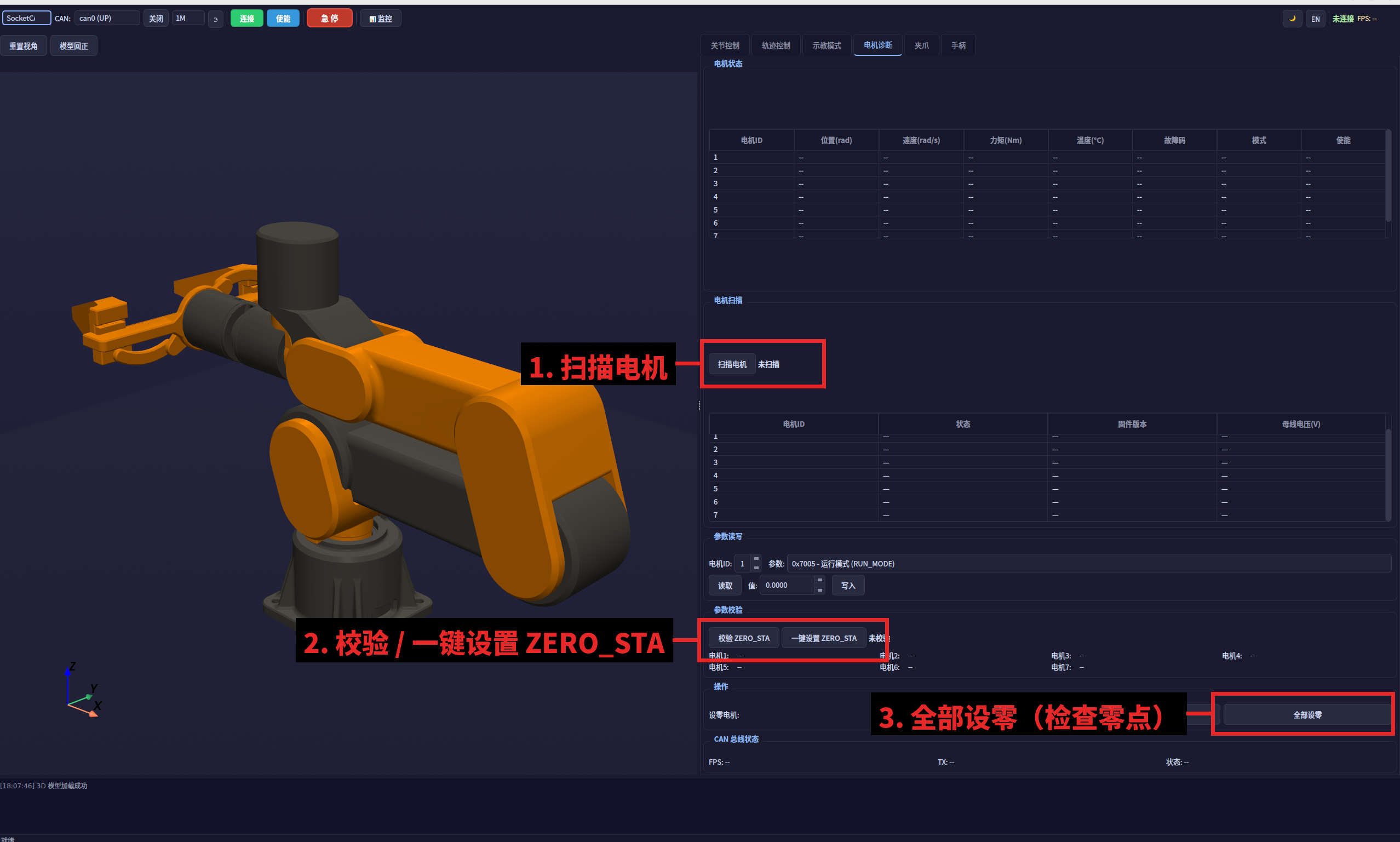
请在上电之前使用上位机(电机诊断页)按下图红框标注的步骤检查电机 ID、ZERO_STA 和零点:
- 扫描电机 — 确认 7 个电机 ID(1~7)全部在线;
- 校验 / 一键设置 ZERO_STA — 确认各电机 ZERO_STA 参数正确;
- 全部设零 — 将机械臂摆到机械零位后设置零点。
CAN 接口配置
# 使用脚本(推荐)sudo bash scripts/setup_can.sh can0 1000000 # 或手动配置sudo modprobe gs_usbsudo ip link set can0 type can bitrate 1000000sudo ip link set can0 txqueuelen 1000sudo ip link set can0 up # 验证ip link show can0
English
A 7-DOF desktop robotic arm project comprising two independent sub-projects: a pure Python SDK and a ROS2 control system.
Sub-projects
| Project | Path | Description |
|---|---|---|
| Python SDK | el_a3_sdk/ | Pure Python SDK with direct CAN communication, multi-arm management, and Pinocchio dynamics |
| ROS2 Control System | el_a3_ros/ | ros2_control hardware interface, MoveIt2 motion planning, URDF description |
| Hardware Manufacturing | hardware/ | STEP models, 3MF print files, wiring harness drawings, PCB files, assembly SOP |
For detailed documentation, refer to the README.md in each sub-project directory.
Note: Large files in the
hardware/directory are managed via Git LFS. Rungit lfs pullafter initial clone.
Hardware Requirements
| Item | Specification |
|---|---|
| Robotic Arm | EL-A3 7-DOF (6 arm joints + L7 gripper) |
| Motors | Robstride RS00 ×3 (L1-L3) + EL05/RS05 ×4 (L4-L7) |
| CAN Adapter | CANdle / gs_usb compatible device |
| Power Supply | 24V / 48V DC |
| PC | Ubuntu 22.04+ x86_64 |
Motor Configuration
| Joint | Motor ID | Model | Torque Limit | Velocity Limit | Position Limit | Direction |
|---|---|---|---|---|---|---|
| L1 | 1 | RS00 | ±14 Nm | ±33 rad/s | ±2.79 rad (±160°) | -1 |
| L2 | 2 | RS00 | ±14 Nm | ±33 rad/s | 0~3.67 rad (0°~210°) | +1 |
| L3 | 3 | RS00 | ±14 Nm | ±33 rad/s | -4.01~0 rad (-230°~0°) | -1 |
| L4 | 4 | EL05/RS05 | ±6/±5.5 Nm | ±50 rad/s | ±1.57 rad (±90°) | +1 |
| L5 | 5 | EL05/RS05 | ±6/±5.5 Nm | ±50 rad/s | ±1.57 rad (±90°) | -1 |
| L6 | 6 | EL05/RS05 | ±6/±5.5 Nm | ±50 rad/s | ±1.57 rad (±90°) | +1 |
| L7 (Gripper) | 7 | EL05/RS05 | ±6/±5.5 Nm | ±50 rad/s | ±1.57 rad (±90°) | +1 |
Software Environment
| Dependency | Version / Notes |
|---|---|
| OS | Ubuntu 22.04+ (x86_64) |
| Python | 3.10+ |
| ROS2 | Humble Hawksbill (required only for the ROS2 sub-project) |
| CAN Bus | SocketCAN · CAN 2.0 Extended Frame · 1 Mbps |
| Core Python Dependencies | numpy, pyyaml |
| Optional Python Dependencies | pinocchio (pip install pin) — FK/IK/Gravity compensation |
| Debugger GUI | pyqt6, pyqtgraph, pyvista, pyvistaqt (pip install -e ".[debugger]") |
| ROS2 Dependencies | ros2_control, MoveIt2, pick_ik, joy, etc. (install via scripts/install_deps.sh) |
Debugger GUI Installation
The Debugger provides a PyQt6-based GUI with 3D URDF visualization (PyVista/VTK), joint drag control, and real-time monitoring.
Verified on Ubuntu 22.04 + Python 3.10 (PyQt6 6.11 / pyvista 0.47 / vtk 9.5).
# Ubuntu system dependencies (OpenGL runtime + Qt xcb platform plugin)# Note: libgl1-mesa-glx was replaced by libgl1 since Ubuntu 22.04; Qt 6.5+ requires libxcb-cursor0sudo apt install -y libgl1 libxrender1 libxcb-xinerama0 libxcb-cursor0 # Install the SDK in editable mode with Debugger dependencies# (pyqt6 / pyqtgraph / pyvista / pyvistaqt); the "dynamics" extra adds Pinocchio (pin) for FK/IKcd el_a3_sdkpip install -e ".[debugger,dynamics]" # Launch (installed to ~/.local/bin — make sure it is on your PATH)el-a3-debugger
CAN Interface Setup
# Using the provided script (recommended)sudo bash scripts/setup_can.sh can0 1000000 # Or configure manuallysudo modprobe gs_usbsudo ip link set can0 type can bitrate 1000000sudo ip link set can0 txqueuelen 1000sudo ip link set can0 up # Verifyip link show can0