
DW05: A Multimodal World Model for Embodied Intelligence




DW05 is a multimodal world model for embodied decision-making, designed to understand how actions shape future outcomes in robot environments. It unifies future video prediction, action generation, and state-value estimation in one framework, with released weights, inference code, and training code.
Latest Updates
- 2026-07: Initial DW05 public release with weights and inference code.
Architecture Scope
DW05 uses language, image/video, robot type, state, and action inputs for embodied world modeling. It follows an MoT framework where a Wan backbone is followed by three expert heads for video, action, and value modeling.
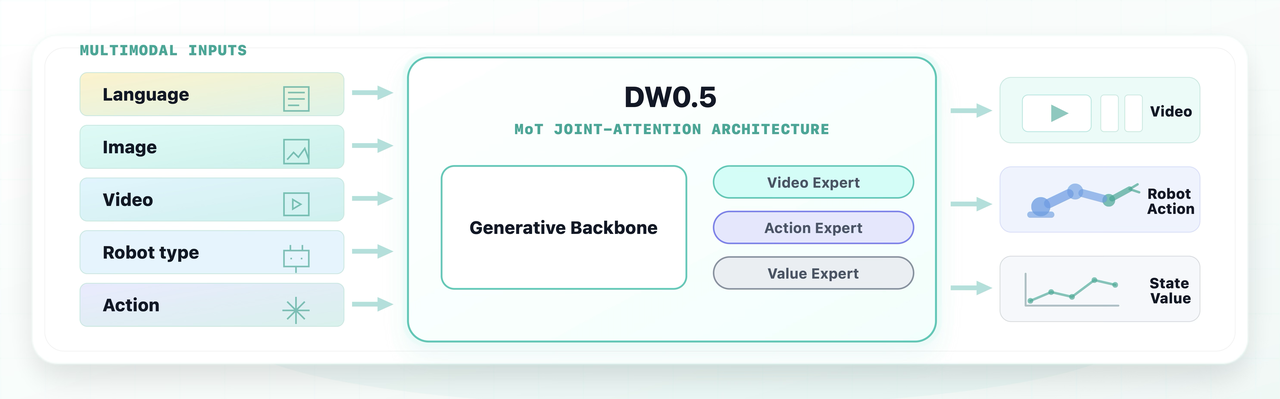
Note: the Value Expert will be updated in a later release.
Model Preparation
Download the released DW05 assets from Hugging Face:
| Model | Description | Checkpoint |
|---|---|---|
| Base | Base DW05 model pretrained on multi-source dataset | 🤗 Dexmal/DW05-Base |
| SFT-RBT | Robotwin 2.0 fine-tuned DW05 model for evaluation | 🤗 Dexmal/DW05-Robotwin |
Example checkpoint download:
huggingface-cli download Dexmal/DW05-Base --local-dir ./checkpoints/DW05-Basehuggingface-cli download Dexmal/DW05-Robotwin --local-dir ./checkpoints/DW05-Robotwin
Environment Setup
The recommended environment uses Python 3.10+ with a CUDA-enabled PyTorch build. Install this repository in editable mode:
cd /path/to/dexbotic-dw05pip install -e .
Optional attention packages can be installed when they are compatible with your CUDA/PyTorch stack:
pip install -e '.[attention]'
Common runtime environment variables:
export DW05_MODEL_BASE_PATH=/path/to/local/model/rootexport DIFFSYNTH_MODEL_BASE_PATH=$DW05_MODEL_BASE_PATHexport TOKENIZERS_PARALLELISM=false
Data Preparation
DW05 uses RobotWin-style episode annotations. Each episode is stored as JSONL,
where each line describes one frame. The dataset can read local paths or remote
paths through megfile, and local mirrors can be configured with path-prefix
overrides.
The README examples assume a small demo split constructed from three tasks in our existing RobotWin-style dataset. The demo keeps complete episode JSONL files for those tasks and follows the same directory structure as the full dataset:
/path/to/dw05_demo/ annotations/ task_a/ episode_000000.jsonl ... task_b/ episode_000000.jsonl ... task_c/ episode_000000.jsonl ... text_embeddings/ norm_stats.json
The demo split is only for illustrating the expected layout and file format; the training code consumes it in exactly the same way as the full dataset.
A DW05 sample is expected to provide:
- camera observations referenced by
images_1,images_2, andimages_3, or equivalent fields configured throughdata_config.images_keys; - a
typelist containingaction,wm, or both; - a robot prompt at
robot.promptfor action samples; - a world-model caption at
worldmodel.captionfor video samples; - robot
state, optionalproprio, and action trajectories; - cached text embeddings, or a configured fallback for missing embeddings;
- optional normalization stats in
norm_stats.jsonformat.
One JSONL line has the following format. The same fields are repeated for each
frame in an episode, with frame_idx, image paths, and robot state updated per
frame:
{"type":["action","wm"],"images_1":[{"type":"video","url":"videos/front/episode_000000.mp4","frame_idx":0}],"images_2":[{"type":"video","url":"videos/left/episode_000000.mp4","frame_idx":0}],"images_3":[{"type":"video","url":"videos/right/episode_000000.mp4","frame_idx":0}],"robot":{"prompt":"pick up the red block","state":[0.0,0.1,0.2,0.3,0.4,0.5,0.6,0.7,0.8,0.9,1.0,1.1,1.2,1.3],"subtask":"reach the red block"},"worldmodel":{"caption":"A video recorded from a robot's point of view executing the following instruction: pick up the red block"},"robot_task_success":1}
For image-only storage, replace each video item with
{"type":"image","url":"images/front/frame_000000.jpg"}. For action-only norm
stat computation, type, robot.prompt, and robot.state are sufficient, but
full training samples should include camera observations and cached text
embeddings for the selected prompts/captions.
Set the dataset paths with environment variables:
export DW05_ROBOTWIN_ANNOTATIONS=/path/to/dw05_demo/annotationsexport DW05_ROBOTWIN_TEXT_EMBED_DIR=/path/to/dw05_demo/text_embeddingsexport DW05_ROBOTWIN_NORM_STATS_PATH=/path/to/dw05_demo/norm_stats.jsonexport DW05_ROBOTWIN_DATA_PATH_PREFIX=/path/to/media/rootexport DW05_ROBOTWIN_INDEX_PATH_PREFIX=/path/to/dw05_demo/annotations
The built-in recipe is robotwin_baseline, registered in
dexbotic/data/dataset/dw05/data_source.py. You can also bypass the built-in
recipe with explicit experiment overrides:
python playground/example_dw_exp.py --task smoke \ data_config.annotations=/path/to/annotations \ data_config.data_path_prefix=/path/to/media/root \ data_config.index_path_prefix=/path/to/index/root \ data_config.text_embedding_cache_dir=/path/to/text_embeddings \ data_config.norm_stats_path=/path/to/norm_stats.json
If remote media paths are mirrored locally, set one or more mirror roots with the platform path separator:
export DW_LOCAL_MIRROR_PREFIXES=/local/mirror/root
Compute action normalization stats for a local dataset:
python playground/example_dw_exp.py --compute-norm-stats \ data_config.annotations=/path/to/annotations \ data_config.data_path_prefix=/path/to/media/root \ data_config.text_embedding_cache_dir=/path/to/text_embeddings \ norm_stats_config.norm_save_path=./runs/dw05/norm_stats \ norm_stats_config.batch_size=128 \ norm_stats_config.max_batches=500
The output file is:
./runs/dw05/norm_stats/norm_stats.json
Use this file as data_config.norm_stats_path, DW05_ROBOTWIN_NORM_STATS_PATH,
or the runtime --norm-stats-path argument where available.
Inference
Action-conditioned RobotWin demo
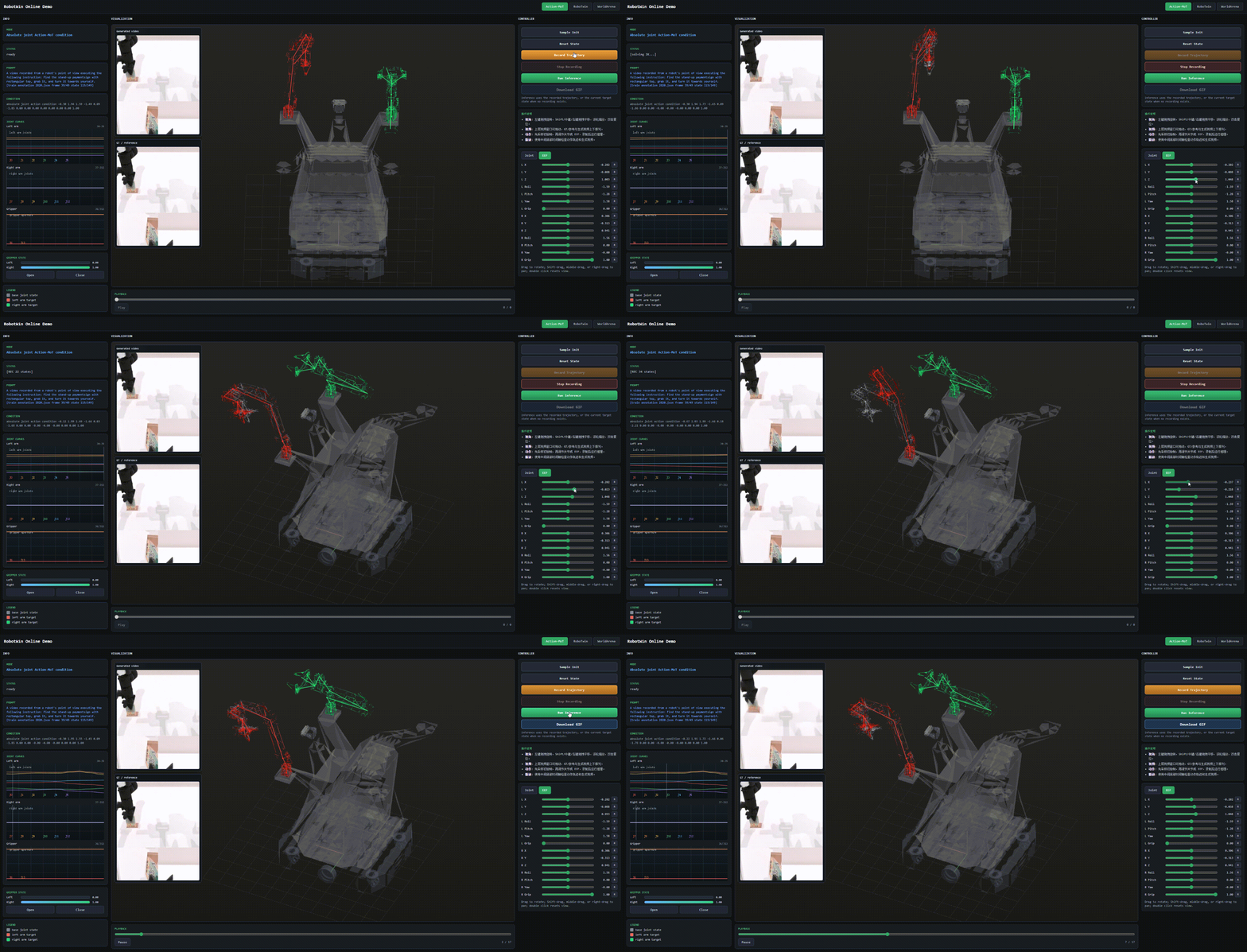
We visualize an action-conditioned RobotWin rollout, where DW05 predicts the future video conditioned on robot observations and actions. The corresponding demo entrypoint is playground/online_demos/robotwin_online_demo.py.
Open-loop image inference
Use the main experiment entrypoint for a simple image-conditioned rollout:
python playground/example_dw_exp.py --task inference \ inference_config.checkpoint_path=/path/to/dw05_checkpoint.pt \ inference_config.input_image_path=/path/to/condition.png \ inference_config.prompt="A video recorded from a robot's point of view executing the following instruction: open the drawer" \ inference_config.output_mp4=./runs/dw05/inference.mp4 \ inference_config.num_inference_steps=10
This writes the generated video to inference_config.output_mp4.
Action-conditioned JSONL inference
Use the ALOHA/RobotWin-style single-sample script when you want inference from a JSONL episode frame with action and proprio conditioning:
python script/dw/infer_aloha_joint.py \ --ckpt /path/to/dw05_checkpoint.pt \ --jsonl /path/to/episode.jsonl \ --frame-index 0 \ --model-base-path /path/to/local/model/root \ --output-dir ./runs/dw05/aloha_joint_sample \ --device cuda:0 \ --num-inference-steps 4 \ --num-video-frames 9 \ --action-horizon 32
The script saves visualizations, pred_action.pt, and metadata.json under the
output directory.